Agent permissions
Choose where your agent can work. Its capabilities follow your current role in each collection.
Permissions follow your role
| Your role | The agent may | Publication |
|---|---|---|
| Owner | Edit collection name, description, settings, terms, definitions, sources and licenses | Publish, withdraw and change public visibility |
| Editor | Edit terms, definitions, sources and licenses | Ask the owner to publish; collection metadata is read-only |
| Viewer | Read the collection | No publication |
A token never upgrades your role. Revoking access or changing your role takes effect on subsequent requests and before queued publication is applied.
Create a token
- 1Open Connected agents or choose Create agent token on your home page.
- 2Enter a recognizable name and an expiry date. Select specific collections in a workspace, including collections shared with you, or enable All current and future collections.
- 3Choose Use my collection permissions. Each selected collection shows your effective role. Global access includes personal collections and organization or shared collections you can manage, including future collections; editor access remains terminology-only.
- 4Optionally choose Read only or Only propose changes. Proposal-only agents submit suggestions for a person to commit. These restrictions can reduce permissions but cannot grant owner access.
- 5Create the token and copy it once. Add the MCP URL and use the token as the Bearer credential in your client configuration.
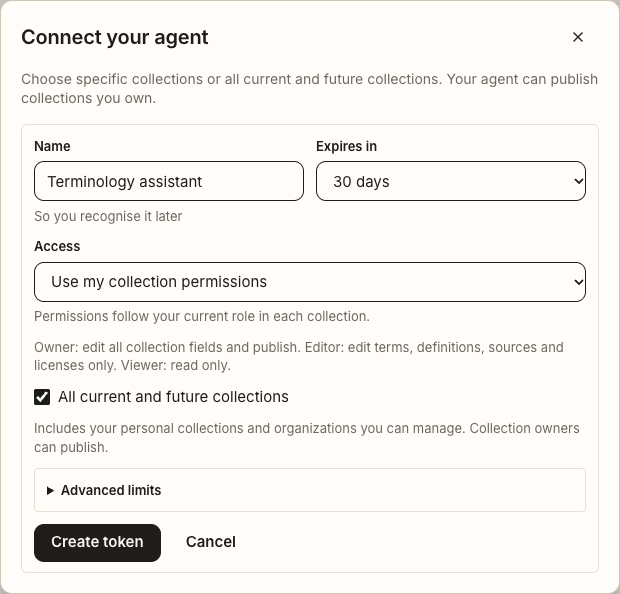
Advanced language and batch limits route edits through proposals. Explicit collection review policies still apply. Revoke a token at any time without a password or human challenge; issuing a new token may require recent sign-in verification.
Publish as an owner
- 1Prepare a release preview with the current collection revision. Review the exact fields, sources and open licenses.
- 2Submit the preview with consent and a rights statement. As the collection owner, your agent can authorize publication of that submitted preview.
- 3A worker rechecks current authorization and applies publication. Set the collection page to public after a published release exists. Editors receive an owner-required message.
Existing tokens and OAuth
Existing Assist and Draft credentials retain read-only and proposal-only restrictions. Existing Curate and Steward credentials retain their approved scopes and limits. They are not silently upgraded by this redesign.
New OAuth consent uses the same role-based permission descriptions and optional restrictions. A client requesting only reading or proposals cannot obtain full editing permission. Existing OAuth grants retain their approved limits until separately authorized again.
Global access changes the collection range, not the role. Collection ownership never grants access to another person's account or unrelated collections.